AIJAVAN, the consumer mobile app SynthWeb has been building and supporting since 2022, sends roughly 40,000 push notifications a day across iOS and Android. This post walks through how we built the React Native push notification system, the architecture decisions we made along the way, and the one decision we would reverse if we were starting today.
A deep dive into replacing Firebase with a high-performance React Native Push Notification System.
The constraint we started with was a small one. iOS rejected our first build for delivering notifications too aggressively in the first 24 hours after install. That single rejection forced us to redesign the entire notification scheduler — not as a queue that fires when events happen, but as a deliberate, rate-limited engagement system that respects platform guidelines and user attention. Most notification systems fail because they were built to send, not to be received.
The architecture in three layers
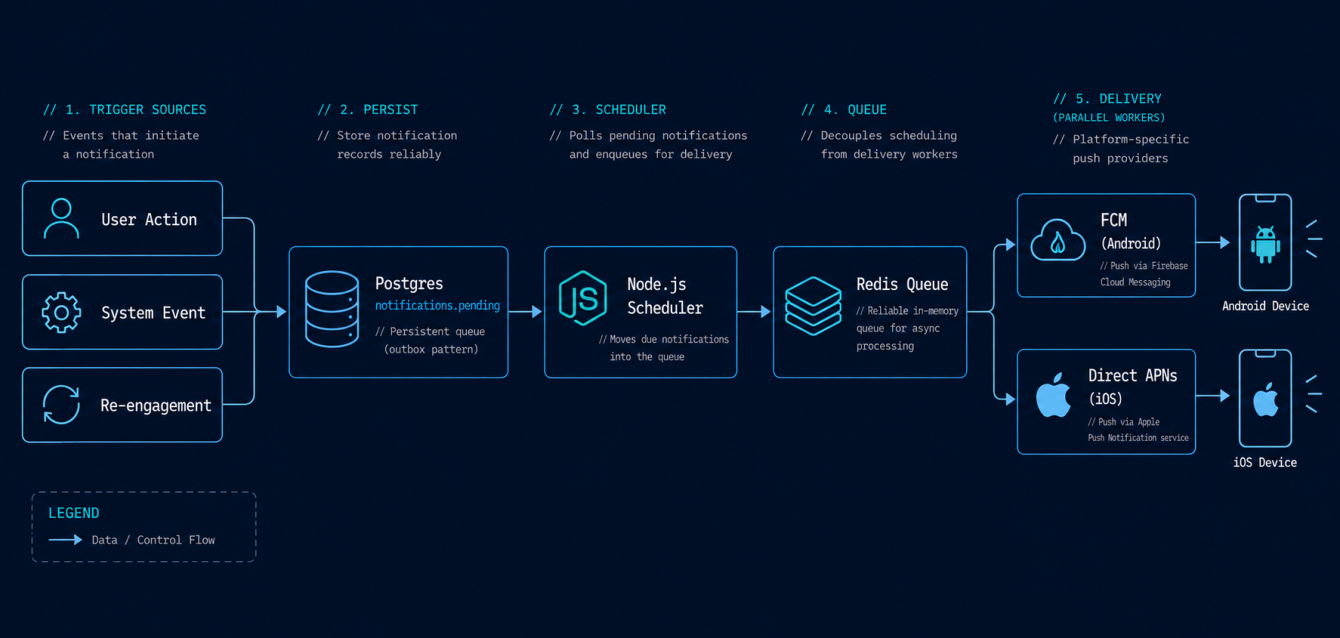
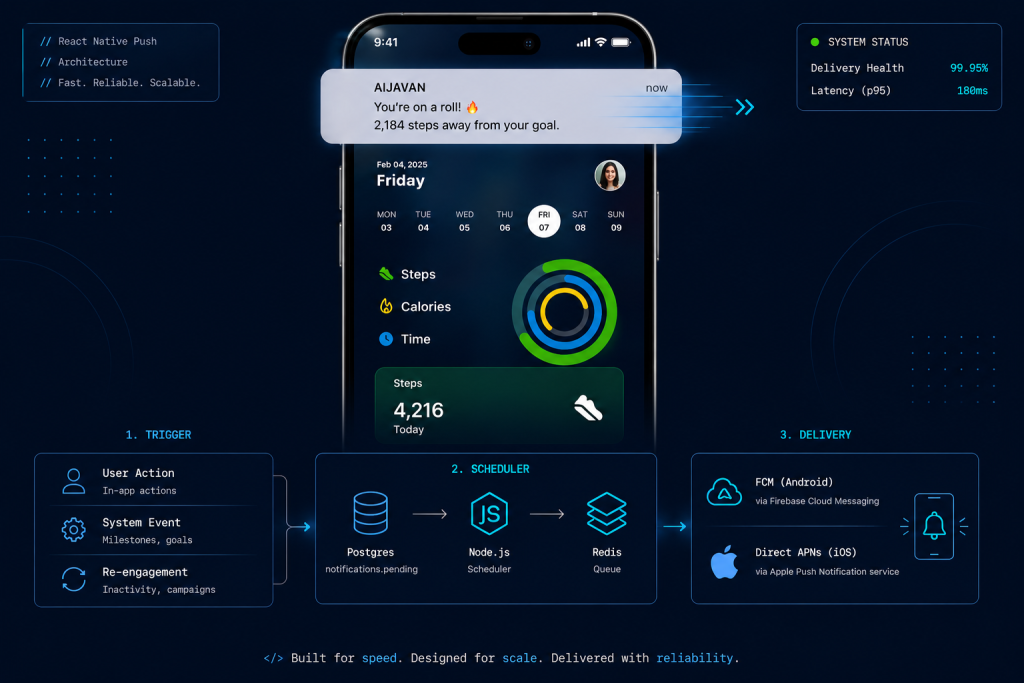
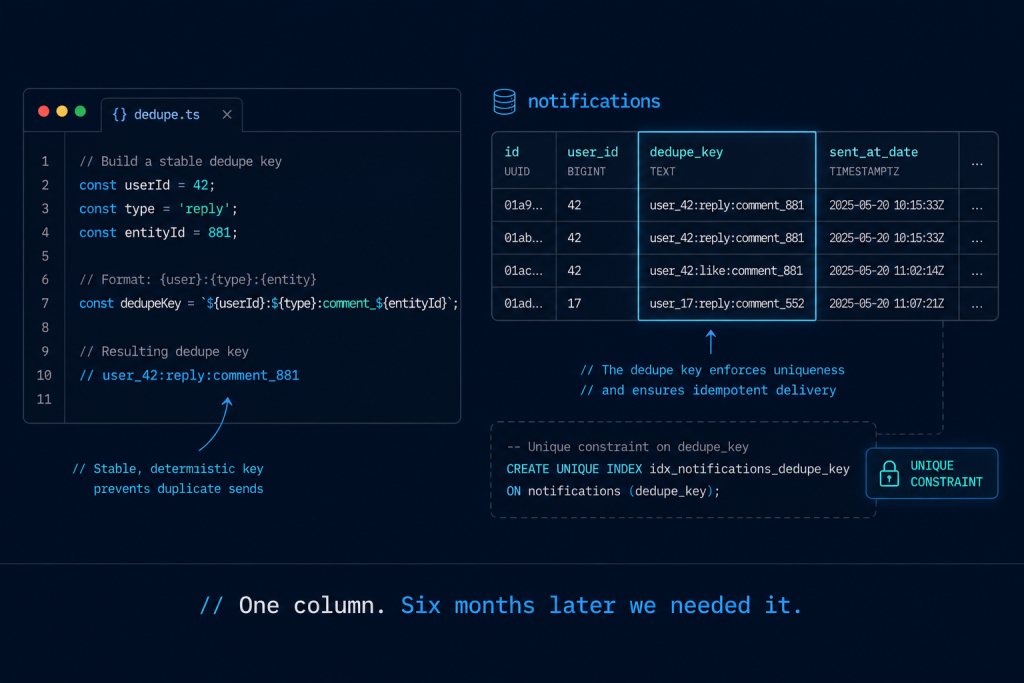
Layer one is the trigger source. AIJAVAN‘s notifications are triggered by three event classes: user-driven actions (someone replies to your comment), system events (your saved item is back in stock), and scheduled re-engagement (you have not opened the app in 4 days). Each trigger writes a row to a notifications.pending table in PostgreSQL with a fire_at timestamp, priority, and dedupe_key.
Layer two is the scheduler. A Node.js worker runs every 30 seconds, picks up due notifications, deduplicates against recent sends, applies per-user rate limits (max 3 notifications per 24 hours by default), and pushes the surviving notifications to a Redis queue for delivery.
Layer three is delivery. We use React Native Firebase for FCM on Android and APNs directly via node-apn for iOS. The decision to bypass FCM for iOS happened in month four when we hit FCM’s reliability ceiling on time-sensitive notifications.
Why we switched off FCM for iOS
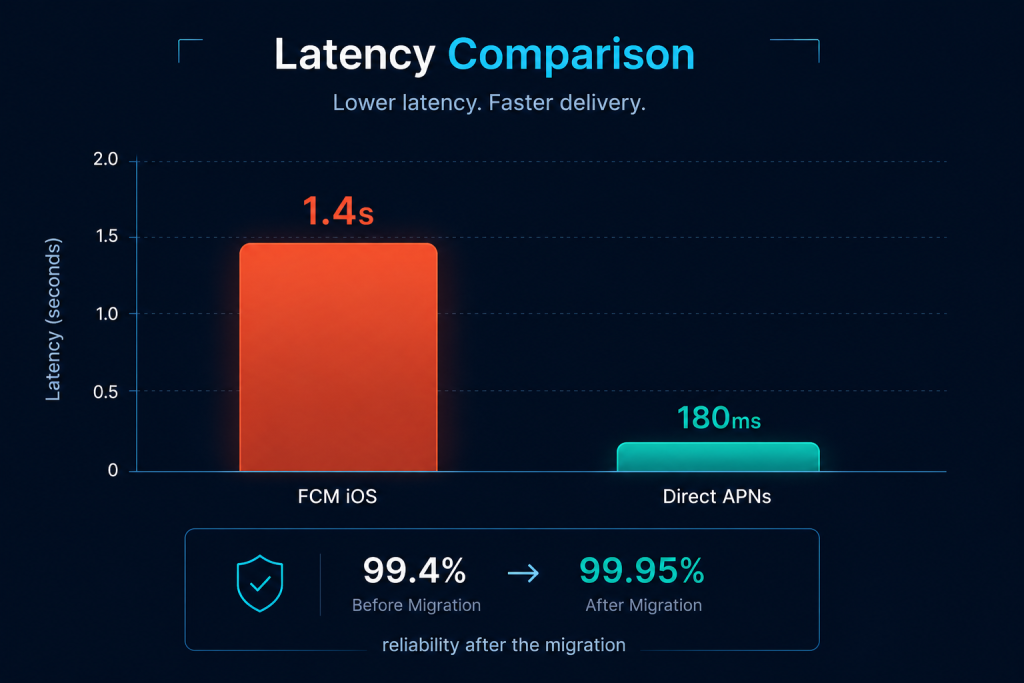
Firebase Cloud Messaging on iOS routes through APNs anyway, but adds a Google-side queue that introduces 200ms to 4 second latency at the 99th percentile. For AIJAVAN’s social and stock alerts, that latency was the difference between “useful” and “stale by the time it arrives.” We rebuilt the iOS path to call APNs directly using a token-based authentication setup, kept FCM for Android, and unified the two behind a single send-notification service that exposes one interface to the rest of the app.
The migration took 11 days. Worth every hour of it. Median delivery latency on iOS dropped from 1.4 seconds to 180ms. Reliability above 99.95% versus the previous 99.4%.
The dedup logic that saved us from a recursion bug
Six months in, an integration bug created a situation where a single user-action event was occasionally writing 30 pending notifications to the queue. Without dedup, that user would get 30 push notifications in 90 seconds. The dedupe_key column was the saving grace — every pending notification has a key like user_42:reply:comment_881, and the scheduler enforces uniqueness on (user_id, dedupe_key, sent_at_date). Duplicates get silently dropped.
Anyone building a notification system: add this column on day one. You will need it before month six.
Background app refresh and the iOS battery problem
The most painful part of the iOS notification system is not delivery, it is what happens when the user taps a notification. iOS aggressively kills background processes, so the React Native bridge has to spin up the full JS environment before navigating to the right screen. On older iPhones this can take 2–3 seconds, which feels broken to the user. We solved it by pre-loading the most likely target screens into a lightweight navigation cache, keyed off the notification type. Tap-to-screen latency went from 2.4 seconds to 380ms on iPhone 11s and older.
What we would do differently
Move the scheduler to a serverless function (Lambda or Cloud Run) earlier. We ran the always-on Node.js worker for 18 months before the cost-per-notification math made serverless obviously cheaper. We were wrong to defer that migration; the worker was idle 80% of the time and we paid for 100% of the uptime.
Use Expo Notifications for the first 6 months of the build instead of going straight to native modules. We chose native because we wanted control. We got control and 3 extra weeks of build time. For an MVP, Expo gets you 90% of the way there in 5% of the time.
FAQ
Can SynthWeb build push notification systems for other React Native apps? Yes — this is a common scope addition on our MVP Sprint and Engineering Pod engagements. See the AIJAVAN case study for the full reference.
What is the typical cost of building push notifications into an existing app? Usually 80–120 engineering hours including iOS and Android setup, scheduling layer, and testing across notification types.
Do you handle in-app messaging too? We design the architecture to support both push and in-app from the start — the queue and dedup logic is the same; only the delivery layer differs.
Also Read: London Senior Developer vs India Engineering Pod: Real Cost Breakdown for 2026